Relocation Guidance

Use this guidance to help you plan and prepare for your relocation.

To help ensure a smooth relocation, you must: 

  1. Submit a relocation request for reimbursement (if applicable).
  2. Obtain NHSC relocation approval.
  3. Follow relocation rules.
  4. Choose your relocation move and storage options.
  5. Review relocation expenses (maximum, allowable, not allowable).
  6. Follow steps to receive your reimbursement.

1. Submit a relocation request for reimbursement (if applicable)

Things to know before submitting:

  • To relocate to your new job site and receive reimbursement, you must obtain approval from NHSC by submitting a relocation request in your My BHW
  • Submit your request at least 21 business days in advance, or as soon as you upload the NHSC Offer & Acceptance Employment Form (PDF - 285 KB) to begin the relocation process.
  • Do notrelocate without prior approval from NHSC. If you do not receive prior approval from NHSC, your allowable expenses will not be reimbursed.
  • Review all relocation guidance on this page.

Relocation request instructions

  1. Upload the NHSC Offer & Acceptance Employment Form (PDF - 285 KB) and if you have them, your licensure and Professional Exam/Board Scores.
    • If you are unable to upload all (3) employment placement documents, you will need to take additional steps later. See Section 2bii below.
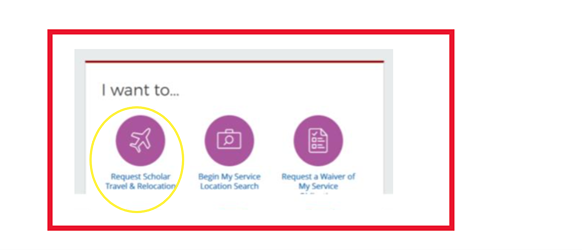
  2. Go to the "I want to..." section, select the purple icon "Scholar Travel and Relocation."

    I want to request scholar travel & relocation
  3. Choose a relocation option:Federal Funded (Government-Managed) or Self-move.
    • If Advance Storage is needed, you must submit a separate request.
  4. Fill in all requested information.
  5. Enter your departure address in the comment box. This may be different from the address listed in your portal.

Important

Do not relocate without prior approval from NHSC. If you do not have prior approval from NHSC, your expenses will not be reimbursed.

2. Obtain NHSC relocation approval

After NHSC receives your Relocation Request, you will get a message in the My BHW portal within three (3) business days letting you know:

  1. If your relocation request is approved.
    1. If your request is not approved, an explanation will be provided.
  2. Your type of approval
    1. You will receive Full/Standard approval if you upload all (3) employment placement documents when you submit your request. No further action is needed.  
    2. You will receive Conditional Approval if you are unable to upload all (3) required employment placement documents when you submit your request (e.g. if you are still waiting for your license or board scores). You will need to take additional steps later to receive Full/Standard Approval.
      • Conditional approval allows you to begin working with CivilityMS to start planning your relocation.
      • You still must obtain Full/Standard approval to receive full reimbursement of allowable expenses. 
        • To receive Full/Standard approval: Upload all three (3) required employment placement documents & submit a new relocation request.
  3. If CivilityMS has been notified that your relocation request is approved.
    1. CivilityMS will send you an email from hrsa-s2s@transitiontoservice.com with steps to schedule a Relocation Planning Appointment.
    2. Confirm your email address and phone number in the My BHWportal is correct so CivilityMS can contact you.
    3. Follow instructions to create your CivilityMS Travel Management Portal account (if applicable).
      • Your email address will serve as your username when logging into the Travel Management portal.
      • cms to the end of your email address to create your account, e.g. JSmith@abcclinic.com.cms
    4. You must schedule two appointments:
      1. Before your move: Initial Relocation Planning Call
      2. After your move: Reimbursement Planning Calls/Expense Form Submission
  • If there are no available appointments with CivilityMS before your move, you are still eligible for reimbursement of allowable expenses. Refer to the Allowable Expenses section below and save your receipts. All receipts must be saved as PDF documents and show proof of payment.

3. Follow relocation rules

  • You are not eligible for relocation assistance or reimbursement if:
    • You currently live within 50 miles of your new job location AND
    • Your move is less than 50 miles from your origin residence to your new residence.
      • Origin residence is your address currently listed in the MyBHW portal or the address you listed in your relocation request.
  • Relocation support covers your move from one residence to your new residence for your initial new position. It does not cover additional transfers or moves.
  • You must relocate within six months of your employment start date.

We offer two relocation options – Federal Funded (government managed) and Self-move.

4. Choose your relocation move and storage options

You have (2) relocation options, with or without advance storage. 

5. Review relocation expenses

6. Understand how to receive your reimbursement

  1. If you received Full/Standard approval for relocation, go to 5C.
  2. If you received Conditional Approval, you must obtain Full/Standard Approval to be fully reimbursed for allowable expenses.
    1. To receive Full/Standard approval
      • Upload all three (3) required employment placement documents
      • Submit a new relocation request
        NOTE: After NHSC receives your new Relocation Request, you will get a message in the My BHW portal within three (3) business days letting you know if you received Full/Standard approval. CivilityMS will also send you a message from hrsa-s2s@transitiontoservice.com with steps to schedule your next appointment shown below in 5C.
  3. After your move, schedule a Reimbursement Planning Calls/Expense Form Submission appointment in your CivilityMS Travel Management portal.
  4. Upload your receipts and expense report for review and approval, as instructed during your appointment with the CivilityMS Travel Coordinator.
  5. You must submit your expense form for reimbursement within three months of relocation. If you do not submit your receipts and expense form within three (3) months, you are no longer eligible for reimbursement, and any unused funds will no longer be available to you.
  6. Once your reimbursement is approved and processed, you will receive an automatic email from "MELIO" confirming your payment status.

If you do not submit your receipts and expense form within three (3) months, you are no longer eligible for reimbursement, and any unused funds will no longer be available to you.

  1. Once your reimbursement is approved and processed, you will receive an automatic email from "MELIO" confirming your payment status.
Date Last Reviewed: